Browsing '2013': Students starting in 2013
Programming Project, day 23 – Particle Effects!
I didn’t use math vectors, but the same principle. These are my direction and “movement” formulas. The direction variables are set between -1.0 and 1.0 and are then used when calculating “movement” of each particle. I didn’t use math vectors, but the same principle. These are my direction and “movement” formulas. The direction variables are set between -1.0 and 1.0 and are then used when calculating “movement” of each particle.
m_fDirX = (rand()%200-100)/100.0f;
m_fDirY = (rand()%200-100)/100.0f;
m_fX += m_fDirX*m_fSpeed*p_fDeltaTime;
m_fY += m_fDirY*m_fSpeed*p_fDeltaTime;
There are other variables to the particles, this is most of them: a resize timer; an angle and an alpha;
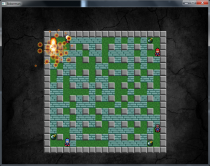
This is the result! I’m very happy with it.
Programming Project, day 23 – Particle Effects!
m_fDirX = (rand()%200-100)/100.0f;
m_fDirY = (rand()%200-100)/100.0f;
m_fX += m_fDirX*m_fSpeed*p_fDeltaTime;
m_fY += m_fDirY*m_fSpeed*p_fDeltaTime;
There are other variables to the particles, this is most of them: a resize timer; an angle and an alpha;
This is the result! I’m very happy with it.


Programming Project, day 22 – part 3
I created particle effects but it still needs some work.
I need to make math vectors to do the math for this. I’m not that good with it right now so I guess that’ll take some time for me. On the flip side, I’ll learn a lot too.
I need the math vectors for calculating a random direction of the particles to travel in, a normalized vector. Right now I have a set direction because I waiting until the math vectors are […]
Programming Project, day 22 – part 3
I created particle effects but it still needs some work.
I need to make math vectors to do the math for this. I’m not that good with it right now so I guess that’ll take some time for me. On the flip side, I’ll learn a lot too.
I need the math vectors for calculating a random direction of the particles to travel in, a normalized vector. Right now I have a set direction because I waiting until the math vectors are […]
Frogger Dev. Post 19
I haven’t actually posted anything in quite a while so I better get back in business before I make a habit out of forgetting to post. Truth is that I haven’t done that much work these last three days, so instead of posting three small posts I decided to combine them into one big post.
Overall, what I’ve done is that I’ve made is that I’ve made a more flexible menu system. Basically I have a state which has several “substates” […]
Frogger Dev. Post 19
I haven’t actually posted anything in quite a while so I better get back in business before I make a habit out of forgetting to post. Truth is that I haven’t done that much work these last three days, so instead of posting three small posts I decided to combine them into one big post.
Overall, what I’ve done is that I’ve made is that I’ve made a more flexible menu system. Basically I have a state which has several “substates” […]
Productive Saturday
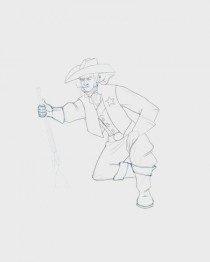
Today I redid a lot of things on the character drawing that we were assigned to make into a solid piece. Watching tutorials during meals sure has paid off. I’ve used several different techniques to improve my character. For example, I tried flipping my drawing horizontally to spot weaknesses in construction. It helped me a great deal! I have also watched a tutorial on how fabric tends to wrinkle. My attempt is surely far from perfect, but it’s my first […]
Productive Saturday
Today I redid a lot of things on the character drawing that we were assigned to make into a solid piece. Watching tutorials during meals sure has paid off. I’ve used several different techniques to improve my character. For example, I tried flipping my drawing horizontally to spot weaknesses in construction. It helped me a great deal! I have also watched a tutorial on how fabric tends to wrinkle. My attempt is surely far from perfect, but it’s my first […]

Sketches & Art: japaneese background WIP
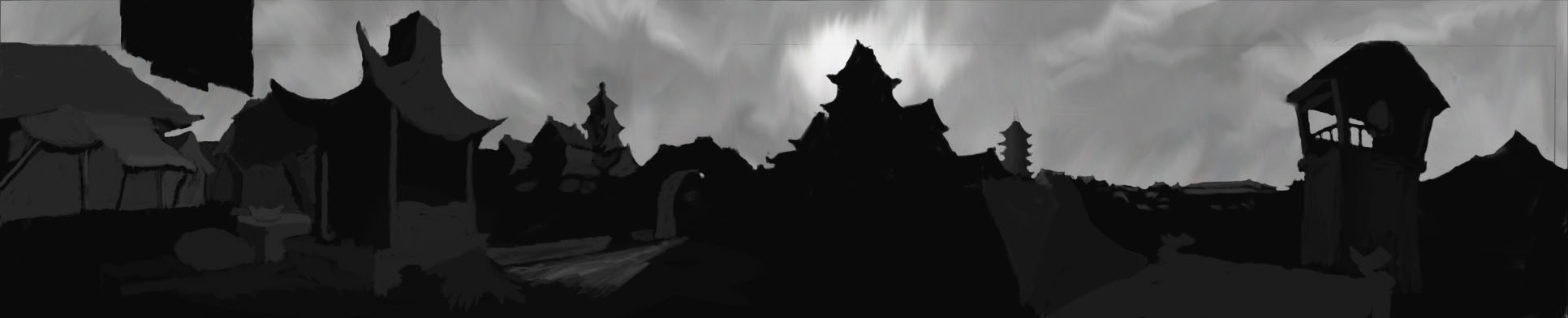
Todays work, I’m currently very content with it.but there is atm very little detail.
Feedback appreciated
Sketches & Art: japaneese background WIP
Todays work, I’m currently very content with it.but there is atm very little detail.
Feedback appreciated
Audio sliders
Today I made audio slider for our options state.There is one sound slider, one music slider and one master audio slider.
The master audio slider goes from 0.0 to 1.0
The sound and music slider goes from 0 – 128
So for example, when I have the music slider on 64 and the master slider on 0.5, my music will play at volume 64 * 0.5 = 32!
Audio sliders
Today I made audio slider for our options state.There is one sound slider, one music slider and one master audio slider.
The master audio slider goes from 0.0 to 1.0
The sound and music slider goes from 0 – 128
So for example, when I have the music slider on 64 and the master slider on 0.5, my music will play at volume 64 * 0.5 = 32!
Day 16, Animation in place!
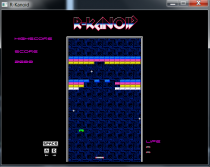
Thanks to Stefan we got our Animation class. The class files was in our shared Dropbox when i woke up and ready to be implemented. I had to change in some other files to get it to work.I then added a ItemObject class that are the powerups you get. For now there is only one powerup and it gives you an extra ball. Original arkanoid gives you 2 new balls I think but I think we settle for 1 new […]
Day 16, Animation in place!
Thanks to Stefan we got our Animation class. The class files was in our shared Dropbox when i woke up and ready to be implemented. I had to change in some other files to get it to work.I then added a ItemObject class that are the powerups you get. For now there is only one powerup and it gives you an extra ball. Original arkanoid gives you 2 new balls I think but I think we settle for 1 new […]
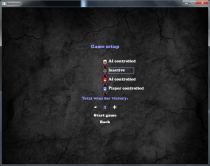
Programming Project, day 22 – part 2
There where some problems with the AI that I fixed. The GameSetupState now has settings for each player, the settings are “Player controlled”, “AI controlled” and “Inactive”.
You can’t click the “Start game” button unless there are 2 or more players active.
Only the active players are shown on the GameEndState.


Programming Project, day 22 – part 2
There where some problems with the AI that I fixed. The GameSetupState now has settings for each player, the settings are “Player controlled”, “AI controlled” and “Inactive”.
You can’t click the “Start game” button unless there are 2 or more players active.
Only the active players are shown on the GameEndState.

Programming assignment 2014-01-11
Today I’ve been reading up on different methods saving collision data while my co-worker worked on the collision manager, there seem to be one million different ways to do it but we have decided to try to make a way to check collision but also check what’s colliding because we want different things to happen to different types of collisions.
Other than that I started to work on animation, which I have to modify to get it to work, in previous […]
Programming assignment 2014-01-11
Today I’ve been reading up on different methods saving collision data while my co-worker worked on the collision manager, there seem to be one million different ways to do it but we have decided to try to make a way to check collision but also check what’s colliding because we want different things to happen to different types of collisions.
Other than that I started to work on animation, which I have to modify to get it to work, in previous […]

Game Programming – Assignment day 17
Continued working on collsion manager today.
I seemed to have managed to make the manager create colliders for game objects and save them in a vector.
I also managed to write out the collider position (x and y coordinates) while the game was running as well as writing out a message when the two positions were identical.
One step closer to proper collision detection.
Game Programming – Assignment day 17
Continued working on collsion manager today.
I seemed to have managed to make the manager create colliders for game objects and save them in a vector.
I also managed to write out the collider position (x and y coordinates) while the game was running as well as writing out a message when the two positions were identical.
One step closer to proper collision detection.

Programming Assignment – Arkanoid themes
Anton and I worked on our game yesterday, I created some graphics for our game that we needed. We are going to let the players use custom themes by using Boost File-system to find folders and their name. So that the only thing you need to do to create a new theme is to add a folder with your graphics in the themes folder and the game will automatically find them and add them to in the options menu.
Well, that’s […]
Programming Assignment – Arkanoid themes
Anton and I worked on our game yesterday, I created some graphics for our game that we needed. We are going to let the players use custom themes by using Boost File-system to find folders and their name. So that the only thing you need to do to create a new theme is to add a folder with your graphics in the themes folder and the game will automatically find them and add them to in the options menu.
Well, that’s […]

Moving an object
The player object was needed to be created on the txt file, get a start position and start moving throughout the whole gamespace.
It took me a while but for the most part is was just copying my professors code. After some help knowing why a few things didn’t help
Moving an object
The player object was needed to be created on the txt file, get a start position and start moving throughout the whole gamespace.
It took me a while but for the most part is was just copying my professors code. After some help knowing why a few things didn’t help